

How to Set Up an RGB Cloud Light in 7 Steps
Last Updated: November 3, 2026
Quick Summary
To set up an RGB cloud light, unpack it and check the parts, mount the two ceiling buckles, hang the fixture, connect the USB cable to a 5V power source, then pair the remote and test the colors. Following this order helps you catch connection problems before the light is fully hung.
- Check all parts against the package list before discarding any packaging.
- Mount the two ceiling buckles and give each a gentle tug before hanging the fixture.
- Use a 5V USB adapter or a USB port that supplies 5V to power the light.
- Point the included remote at the fixture and press power if nothing responds.
- Keep the cloud clear of ceiling fans and light fixtures to avoid tangles.
Table of Contents
Setting up an RGB cloud light is straightforward, but a few details make the difference between a smooth install and a frustrating evening. At Max-Depot, we've put together this guide to walk you through every step, from the box to the first color change. The 3D RGB Cloud Light with App Control, Music Sync & Lighting Effects is the model we'll use throughout, so you can follow along with the exact parts you're holding.
Start by opening the package and laying everything out on a flat surface. Check that the pieces match the list below before you throw anything away. Missing parts are easier to spot early.
Package contents:
- Cloud light fixture, sized roughly 60-70 cm long and 35-40 cm wide
- USB power cable
- 360-degree wireless 2.4G music remote controller
- Two ceiling buckles for mounting
- User manual
Once everything is accounted for, take the cloud out of its compression bag.
WATCH OUT: Don't drag the cloud by its cord or pull hard on the fabric to get it out of the bag. Lift it out slowly with both hands.
How to Set Up Cloud LED Lights Step by Step
Setting up a cloud LED light takes less time than most people expect. The steps below walk you through the process from start to finish.
- Unpack and check all parts against the package list.
- Decide where the cloud will hang and mark the ceiling spot.
- Attach the two ceiling buckles at the marked points.
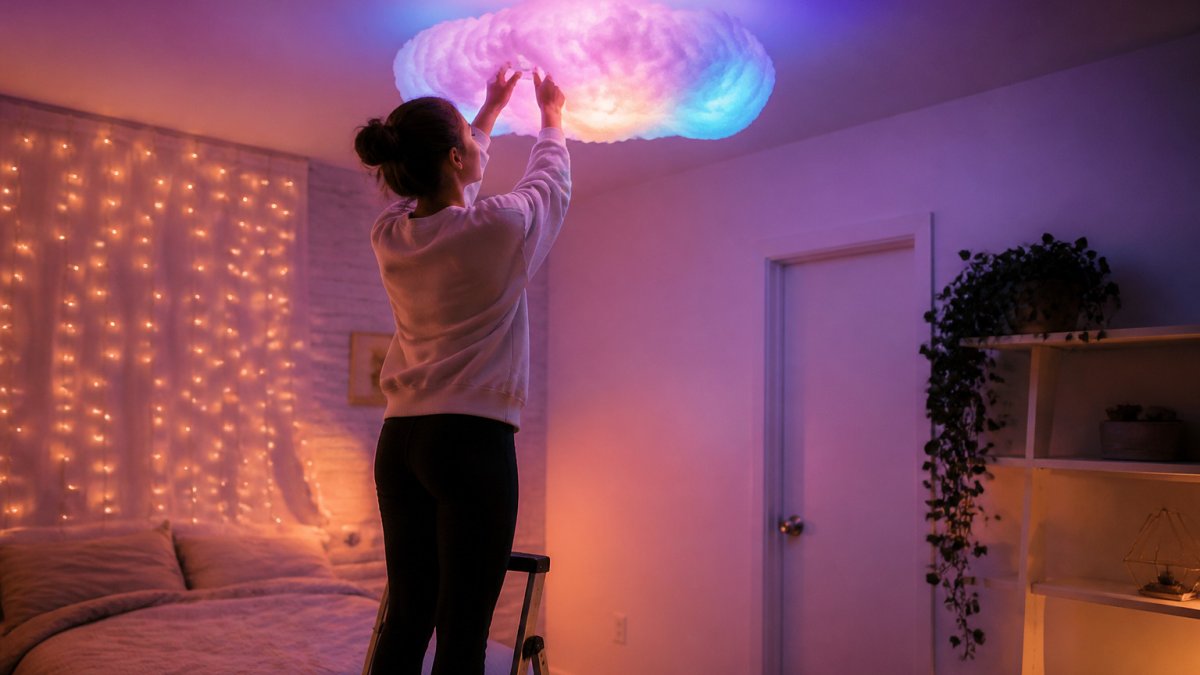
- Hang the cloud fixture from the buckles.
- Connect the USB cable to a 5V power source.
- Pair the remote and test the color modes.
- Adjust brightness and music sync to your liking.
Doing the steps in this order helps you catch problems early. If the light doesn't respond to the remote in step 6, you still have time to check the connections before the fixture is fully hung.
Hanging Your RGB Cloud Light on the Ceiling
Hanging the cloud is the part most people worry about. The good news is that the ceiling buckles do most of the work. You only need a stable surface, a few simple tools, and a little patience.
Choosing a Spot and Mounting the Ceiling Buckles
Pick a spot that is roughly centered over the area you want to light. Make sure the ceiling is solid where you plan to mount.
Mark two points on the ceiling, spaced to match the buckle positions on the fixture. Drill pilot holes at the marks, then screw in the buckles firmly. Give each buckle a gentle tug to confirm it holds before you hang anything heavy.
Ceiling Types and Room Placement
In a bedroom, centering the cloud over the bed creates a soft, even glow. In a kid's room or gaming room, a spot near the middle of the ceiling works best. Keep the cloud clear of ceiling fans and light fixtures to avoid tangles.
3D RGB Cloud Light with App Control, Music Sync & Lighting Effects →
Powering the Light and Connecting the LED Strip Safely
Power is simple, but a few safety habits matter. Use a 5V USB adapter or a USB port that supplies 5V.
Using the Remote and Pairing the RGB Cloud Light App
The included remote controls the light without any app. Point it at the fixture and press the power button. If nothing happens, check that the USB cable is fully seated and the source has power.
This listing includes a 360-degree wireless 2.4G music remote controller. Pairing details are in the manual.
Common fixes:
- Move closer to the fixture and try the remote again.
- Replace the remote batteries if the signal feels weak.
- Restart the light by unplugging it for 10 seconds.
Changing Colors, Brightness and Music Sync Effects
This is where the cloud light shines. The remote lets you change colors and adjust brightness. If you're comparing other starry and ambient projector options for bedroom decor, that guide covers them.
The light includes music sync, which changes colors to match music. Placement details are in the manual.
Brightness controls let you dim the light for relaxing evenings or raise it for parties.
Troubleshooting, Care and Using Your Vivitar RGB Cloud Light Ahead of Setup
Get Your Cloud Light Glowing Tonight at Max-Depot
Setting up an RGB cloud light is a straightforward project. Follow the steps above and test the remote before you finish. Ready to add one to your room? You can browse the 3D RGB Cloud Light with App Control, Music Sync & Lighting Effects at Max-Depot.

Frequently Asked Questions
How do I connect my RGB LED lights?
Plug the USB cable from the cloud light into a 5V adapter, a USB socket or a USB port on a device. Once powered, press the remote's power button to confirm the light responds. Keep the power source within reach and avoid overloading a single outlet with other devices.
How do you set up cloud LED lights?
Start by unboxing the cloud light and checking the ceiling buckles, USB cable, remote and manual. Position the buckles where you want the cloud to hang, then hang the fixture. Connect the USB power, test the colors with the remote, and adjust brightness and effects to suit the room.
Can you control an RGB cloud light with an app?
Some RGB cloud light models support app control, usually through Bluetooth or Wi-Fi. The 3D RGB Cloud Light sold at Max-Depot includes a 360 degree wireless 2.4G music remote, and its listing mentions app control. Check the package contents and manual to confirm which control methods your version supports before you pair it with your phone.
What should I check before buying a cloud ceiling light?
Check the overall size (the 3D RGB Cloud Light measures about 60-70 cm long and 35-40 cm wide), the power method (USB with a 5V adapter), the control type (remote, music sync or app), and what is included in the box. Also confirm the ceiling buckles are in the package and that the ceiling can support a lightweight fabric fixture.
