

How to Avoid Hidden Shipping Fees Online?
Last Updated: November 4, 2026
Quick Summary
To avoid hidden shipping fees online, check the full total before entering payment details. Expand the order summary, confirm your address, and compare the final checkout price across stores rather than the item price alone.
- Look for a shipping cost on the product page before adding items to your cart
- Add one item to your cart early to see the full total
- On mobile, tap the sticky total bar to confirm it opens a full breakdown
- Watch for handling, insurance, and small order fees on the order summary
- Add the same item to each store's cart and compare total cost including shipping and taxes
Table of Contents
- Why Online Stores Hide Shipping Fees Until Checkout
- How to Spot Hidden Shipping Costs at Checkout
- Understanding Free Shipping Minimum Order Rules
- Comparing Shipping Costs Between Online Stores
- Checking International Shipping Fees and Customs Charges
- Handling Unexpected Fees After You Have Paid
- Your Next Step: Check the Total Before You Pay at Max-Depot
- Frequently Asked Questions
Why Online Stores Hide Shipping Fees Until Checkout
Online stores often show a low product price first and save shipping costs for the final step, a tactic that makes hidden shipping fees easy to overlook. Many shoppers call this drip pricing, and it works because people compare the item price and skip the rest.
Why do stores do this? A low price gets you to click. Once you have added an item to your cart, you are more likely to finish the purchase, even when shipping adds a surprise.
Here is what you can do about it:
- Look for a shipping cost on the product page before you add the item to your cart, so no hidden shipping fees catch you off guard at checkout
- Use a shipping calculator if the store offers one
- Add one item to your cart early, just to see the full total
Think of the cart as your first real look at the price. The product page only shows part of the story.
How to Spot Hidden Shipping Costs at Checkout
Checkout is where most hidden fees appear, and the reason is structural: many storefronts do not calculate shipping until they have your full address, so the cart page can honestly show a total that is not the total. The fee is not always hidden on purpose, it is often deferred by the platform's shipping-rate logic. Either way, your job is to force the number to appear before you commit.
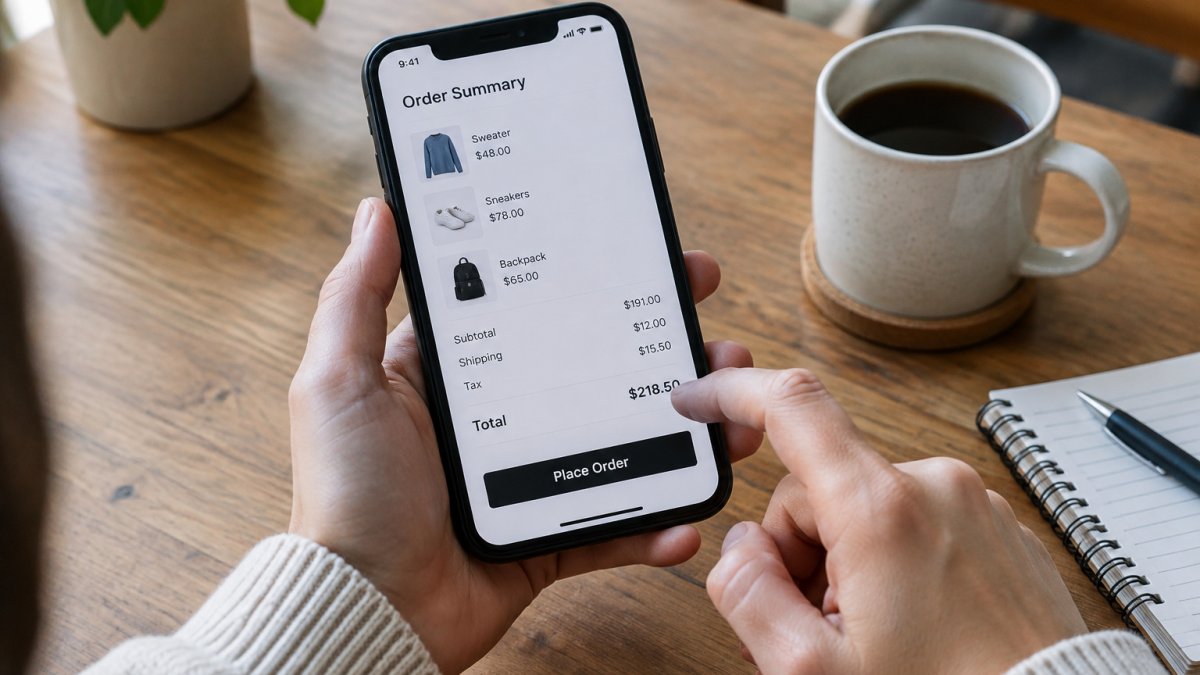
Start by comparing the cart subtotal to the item price you saw on the product page. The difference should be explainable. If it is not, stop and read the order summary line by line.
Reading the Order Summary Line by Line
The order summary is your best tool, but on most modern storefronts it is collapsed by default. Look for a link or chevron labeled "Order summary," "Show details," "View breakdown," or a small caret next to the total. Expand it before you enter payment details. Watch for these common extras:
- Shipping or delivery charges that only appear after you enter your address
- Handling fees, which some stores add on top of shipping
- Insurance fees you did not ask for, sometimes pre-checked
- Taxes or import duties on cross-border orders
- A "small order fee" or "low-value order fee" below a minimum subtotal
If a line item is unclear, click it or hover over it. Many stores hide an explanation in a tooltip or a linked shipping-policy page. If there is no explanation anywhere, treat that as a warning sign and open the store's shipping page in a new tab before paying.
The Mobile Checkout Trap
Hidden fees often behave differently on mobile, and this is where most shoppers get caught. On a phone, the order summary is usually pushed below the payment form or hidden behind a sticky "Total" bar at the bottom of the screen. Tapping that bar may expand a drawer, or it may just scroll you to a collapsed section. Before you tap "Place order," do three things:
- Scroll to the very bottom of the checkout page and look for an expandable summary.
- If a sticky total bar exists, tap it and confirm it opens a full breakdown rather than a single number.
- Rotate to landscape or use your browser's "Request desktop site" option if the mobile layout hides line items entirely.
A common pattern is that the mobile total shown in the sticky bar excludes shipping until the address step is complete, while the desktop summary updates live. If the numbers disagree between mobile and desktop, trust the desktop view.
Watching for Address Correction and Remote Delivery Surcharges
Some fees depend on where you live. Carriers may charge extra for rural addresses or areas that are hard to reach, and some stores pass that surcharge through at checkout.
Double-check your address before you pay, including apartment or unit numbers, postal code, and country. A small typo can trigger a correction fee after the fact.
Watch out: some stores only reveal the remote-area surcharge after you have entered payment details, on the final review screen.
The checkout summary is where most surprise charges appear, so these are the lines to check and what to do about each.
| Extra charge | Where it appears | What to do |
|---|---|---|
| Shipping or delivery charges | After you enter your address | Confirm the total before paying |
| Handling fees | Order summary | Ask whether the store adds them on top of shipping |
| Insurance fees | Often pre-checked | Uncheck if you did not ask for it |
| Taxes or import duties | Cross-border orders | Check who pays before you buy |
| Small order fee | Below a minimum subtotal | Add items to reach the threshold, or skip it |
| Remote delivery surcharge | Final review screen | Look up carrier remote-area lists by postal code |
| Address correction fee | After delivery problems | Double-check unit number, postal code and country |
Understanding Free Shipping Minimum Order Rules
Free shipping sounds great, but the rules can be tricky. Many stores set a minimum order amount before shipping becomes free. Some also limit free shipping to certain items or delivery speeds.
Check the rules before you shop. Look for the free shipping threshold on the store's shipping page. Note whether it applies before or after discounts and taxes.
Sometimes adding one small item gets you over the limit. That can still save money, but only if the extra item is something you actually want. Otherwise, you pay more for the sake of free shipping.
Comparing Shipping Costs Between Online Stores
The cheapest item price does not always mean the cheapest total. To compare stores, add the same item to each cart and go to the final review step. Write down the total cost, including shipping and taxes.
Keep a simple list:
- Item price
- Shipping cost
- Taxes or fees
- Estimated delivery date
- Return shipping cost, if you think you may need it
This quick check takes only a few minutes. It often reveals that the store with the lower item price costs more overall.
Checking International Shipping Fees and Customs Charges
Buying from a store in another country adds more costs. You may pay international shipping, import taxes, customs duties, or handling fees. Some stores show these charges early, while others wait until the package reaches the border.
Look for a clear statement about who pays these charges. Some stores use delivered duty paid pricing, which includes them upfront. Others leave them to you. Check the official customs rules for your country before you buy, because the rules change and the amounts depend on your location and the item.
Handling Unexpected Fees After You Have Paid
Sometimes a fee shows up after payment. A carrier may ask you to pay a customs charge or a delivery fee before they release your package, or a charge may appear on your card statement that you did not see at checkout. This is the stage most shipping-fee guides skip, but it is where you have the most leverage if you act in the right order.
First, Identify What the Fee Actually Is
Before you dispute anything, separate the fee into one of three buckets, because each has a different remedy:
- A carrier-collected fee at delivery (customs duty, import VAT, a remote-area surcharge, or a release fee). This is usually owed to the carrier or customs authority, not the store, and it will not be reversed by a chargeback.
- A store-added fee on your order (handling, insurance, a small-order fee) that was not disclosed before payment. This is the strongest dispute case.
- A duplicate or erroneous charge on your card statement. This is a billing error and belongs with your card issuer.
Check your order confirmation email and the tracking page first. They should show what was charged and why. Screenshot both, along with the checkout page if you can still reach it.
Contesting a Store-Added Fee
If the fee was added by the store and was not shown before you paid, contact the store's customer service in writing, email or chat transcript, not a phone call, with your order number and a screenshot of the checkout total you saw. Ask specifically whether the fee was disclosed before payment and request a refund of that line item. Keep copies of every message.
A common pattern is that stores refund undisclosed handling or insurance fees quickly to avoid a card dispute, but only when you cite the specific line item and the amount. Vague complaints get vague responses.
Disputing a Charge on Your Card
If the store will not refund an undisclosed fee, you can dispute the charge with your card issuer. Under the Fair Credit Billing Act in the United States, you generally have 60 days from the statement date to file a billing-error dispute, and the issuer must acknowledge it in writing within 30 days.
Watch out: filing a chargeback for a customs duty or carrier release fee will usually fail, because that charge is owed to a government or carrier, not the merchant. Confirm which party billed you before you dispute.
When the Fee Is a Customs or Carrier Charge
If the fee is a customs duty or a carrier release fee, your options are narrower. Pay it to receive the package, then check whether the store advertised delivered-duty-paid (DDP) pricing. If it did, the store is responsible for the duty and you can request reimbursement with the DDP statement as evidence.
If you are dealing with a return or a shipping problem, our guide on how to handle online returns when you bought at a discount explains what to expect. For tracking a late package and figuring out where the extra charge came from, see our guide to tracking packages.
Your Next Step: Check the Total Before You Pay at Max-Depot
Before you buy from Max-Depot or any other store, check the full total. Read the order summary line by line, confirm your address, and compare the final price with other options. A few extra minutes at checkout can save you from surprise fees later.
Frequently Asked Questions
How can I avoid shipping fees when shopping online?
Start by adding your full cart and entering your delivery address before you enter payment details. This reveals shipping, handling and tax lines early, so you can compare the final total rather than the advertised price. Look for free shipping thresholds that your basket already meets, and consider combining items into one order to reach them. Current delivery charges depend on the item, destination and order value, so confirm them on the site.
How can I spot hidden shipping costs before checkout?
Check whether the product page shows a delivery estimate or only a headline price. Then add the item to your cart and read the order summary line by line, looking for handling fees, surcharges or insurance add-ons that appear after your address is entered. Be cautious of pre-ticked optional extras such as shipping insurance. If a total changes between the cart and the payment page, take a screenshot and compare the two before paying.
Can free shipping offers have hidden conditions?
Yes. Free shipping often applies only to standard delivery, to certain regions, or once your order passes a minimum spend measured before discounts or taxes. Some offers exclude oversized items or remote postcodes. Read the conditions on the free shipping banner or in the checkout summary, and confirm the threshold is met using the post-discount subtotal. If the rules are unclear, ask the store's support team before you pay.
What should I do if a retailer adds an unexpected shipping fee?
Stop before completing payment and compare the new total with the amount you saw earlier. Take a screenshot of both the product page and the checkout summary, since these help if you need to dispute the charge. Contact the retailer's customer service and ask them to explain the fee in writing. If the charge was added after payment, check your card statement and contact your bank or payment provider about a dispute, as consumer protection rules in your country may also apply.
